Group Policy Object (GPO) template
USB over Network Client includes *.admx and *.adml administrative template files. These template files allow to configure the product via Local GPO and/or Domain-Based GPO. Please refer to Microsoft MSDN article on managing ADMX files.
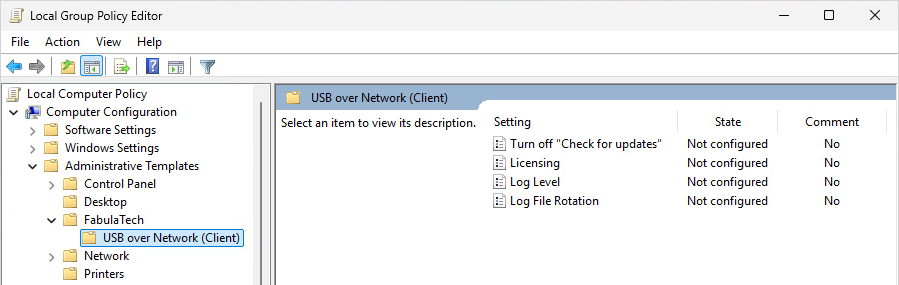
The archive file containing administrative template can be found in the installation directory:
%ProgramFiles%\FabulaTech\USB over Network (Client)\policies.zip
Additionally, the administrative template files are deployed to a local GPO during product installation and can be found here:
%WINDIR%\PolicyDefinitions\Fabulatech.admx
%WINDIR%\PolicyDefinitions\ftusbnetcln.admx
%WINDIR%\PolicyDefinitions\en-US\Fabulatech.adml
%WINDIR%\PolicyDefinitions\en-US\ftusbnetcln.adml
It's recommended to use the GPO template files provided with the latest product version of USB over Network Client.
The GPO template can be used to configure the following settings:
| Setting | Target | Level | Description |
|---|---|---|---|
| Licensing | Computer | FabulaTech, Product |
This policy setting is used for licensing management. The following licensing modes are used:
For "License Key" type of licensing you must specify a string of the key in the corresponding field. For "License Server" type of licensing you must specify a license server name in the name_or_ip:port format, where the port is an optional parameter. If this policy setting is enabled, the licensing mode will be overridden by this policy setting. It means using GPO License key instead key that determined via the settings interface. If this policy setting is disabled or not configured, the licensing mode is determined via the settings interface. |
| Log file rotation | Computer | Product |
This policy setting controls advanced log file rotation behavior. The product may create multiple logs for each user, depending on factors such as Session ID, Process ID (PID), and FabulaTech product module. Each log is stored on disk as a set of log file parts, which are created as the log is rotated. When the active log file part reaches the configured size limit, it is rotated: the current file part is renamed, and a new empty file part is created for the same log. If any of the configured limits are exceeded, the oldest log file parts are automatically removed according to the configured rules.
If this policy is disabled or not configured, log file rotation behavior is controlled by the application’s internal log rotation settings. |
| Log level | Computer | Product |
If this policy is disabled or not configured, the log level is controlled by the application’s internal logging settings. |
| Turn off "Check for updates" | Computer | FabulaTech, Product |
This policy setting determines whether the application is allowed to check for updates and notify the logged-on user.
Enabled:
Disabled:
Not Configured: Note: If this policy setting is applied at the FabulaTech level, it overrides the same policy setting applied at the product level for all installed FabulaTech products. |